Results · Live campaign data · March 2026
Real campaigns.
Real numbers.
Every number on this page comes from live Instantly campaigns running Apex Overlay. No simulations. No cherry-picked runs. Some campaigns are still running. We show those too — because honest data is the only data worth sharing.
95.7%
Sends routed to your best email automatically
+14.2%
More engagement vs Instantly’s equal-split testing
<24h
Winning email found in under a day
12d
Days to full optimization from campaign start
3.2%
Reply rate on best email — while others got zero
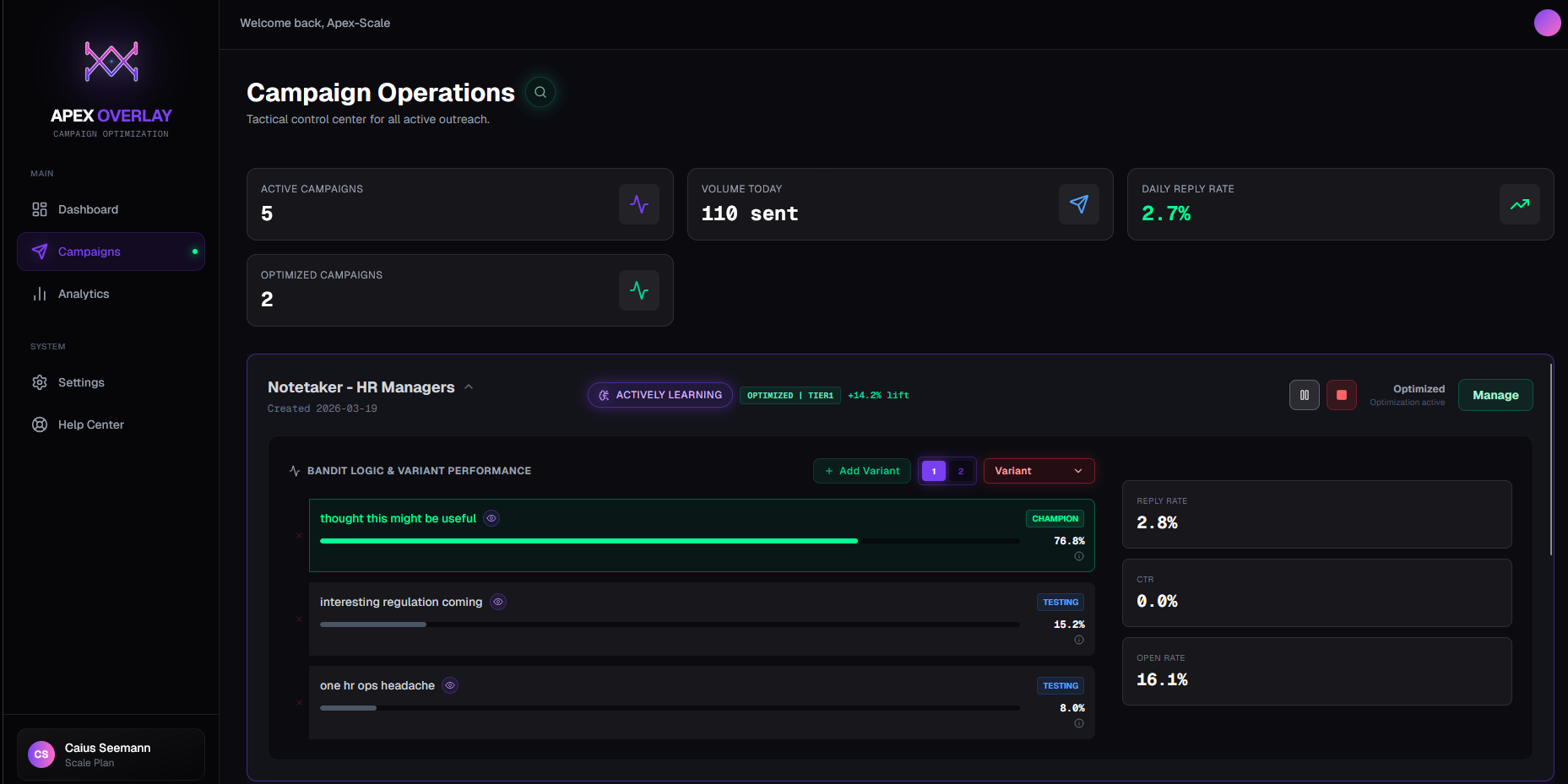
Live dashboard · Campaigns view · March 2026
How StaffCircle got +5.5% more replies from 1,053 HR leads
+5.5%
More replies vs Instantly’s A/B testing
Why does manual A/B testing waste sends in cold email?
Manual A/B testing wastes sends because every email gets equal traffic until you manually intervene — and by then, the weaker emails have already consumed hundreds of leads. Before Apex Overlay, the team ran a standard Instantly A/B test across three subject lines on a list of 1,053 HR leads. All three emails received equal traffic. The plan was to monitor performance over a few days, pick the winner, and manually shift volume — the way most teams do it.
The issue isn't that the approach is wrong. It's that it's slow. While you're waiting for enough data to feel confident, the weaker emails keep consuming sends. At typical cold email volumes, that delay costs you measurable pipeline — not in theory, but in the actual number of clicks and replies you didn't get.
There's a second problem Instantly doesn't surface: not all clicks are human. Email security systems — common in HR and enterprise environments — automatically scan links in incoming emails, creating fake clicks that look identical to real ones. Instantly's reported click rate was 7.88%. After filtering out bot clicks (based on how fast they happened), the real human click rate was 5.41%. The A/B test was partly running on noise.
How much does Apex Overlay improve cold email reply rates?
In this campaign, Apex Overlay delivered +5.5% more engagement than Instantly’s native A/B testing by routing 95.7% of sends to the winning email within 12 days. The engine ran using the same three subject lines. Rather than holding equal split until you have enough data, the engine adjusted how often each email was sent after every reply, click, and open — using real performance data to figure out which email was working best.
By days 4–7, one email had pulled ahead. The engine began sending more of it automatically — no manual intervention, no dashboard check required. By day 12, 95.7% of sends were going to the winning email. The other two weren't killed — they kept getting a small share of sends to keep the sending pattern looking natural to spam filters.
“The curiosity-style subject line beat the direct pitch from the first 1,000 sends — a surprising result we wouldn’t have found without the engine sending more of it early.”
Apex Overlay · StaffCircle campaign analysis
Winning email · 95.7% of sends
"wait is this email about AI notes or did I just get rickrolled by HR"
A curiosity-driven subject line that made the reader genuinely unsure what the email was about. It outperformed two more direct alternatives — one pitching the product’s value, one leading with a pain point — across all major HR job titles.
+5.5%
More engagement vs Instantly
+10%
Extra real clicks and replies vs equal-split
57 real · 26 fake clicks removed
+174
Extra real opens vs equal-split
fake opens removed · real opens only
7.88%
Click rate reported by Instantly
5.41% human clicks · +9%
Which job titles respond best to cold email in HR outreach?
Leadership-level Operations and HR contacts responded best, with click rates of 8.4% and 7.6% respectively. The breakdown split the 1,053 leads into five groups by seniority and job function. The curiosity-style subject line won across leadership job titles. Only Management-level Operations contacts responded better to a direct pitch — a finding that would have been invisible in a standard A/B test.
| Job Title |
Leads |
Click rate |
Best email style |
| Leadership · Operations | 214 | 8.4% | Curiosity style |
| Leadership · HR | 210 | 7.6% | Curiosity style |
| Leadership · Executive | 175 | 6.9% | Curiosity style |
| Management · Operations | 164 | 6.1% | Direct pitch |
| Junior · Operations | 53 | 7.9% | Highest response overall |
→
+10%
extra real clicks and replies
What it looks like inside Instantly
These are the actual interested replies landing in the StaffCircle Unibox — the direct output of the optimized campaign. More sends went to the winning email, those sends turned into real interest, visible inside the platform the team already works from.
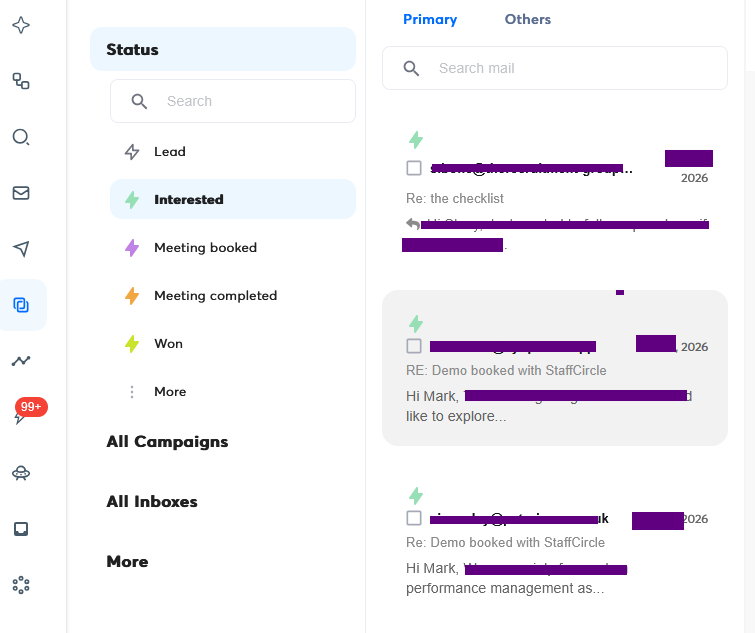
Instantly Unibox · Interested replies from the StaffCircle campaign · Apex Overlay optimised
Want results like these on your campaigns?
Start Free Beta
Use code FOUNDING for 3 months free · Only 10 codes
How Notetaker got +14.2% more replies in 3 days · Live
+14.2%
More replies vs Instantly · Winner found in under 24 hours
How fast can automated optimization find your best-performing email?
In this campaign, Apex Overlay identified the best email within hours and generated a qualified reply on day 1 — before most A/B tests have enough data to start counting. Standard A/B testing says you need enough sends per email before the data is meaningful. At typical cold email volumes that means days — sometimes a week or more — of equal-split sending before you make a change. During that time, every email gets the same share of sends regardless of what the early results say.
The Notetaker campaign showed what happens when you don't wait. Within a few hours of the first sends going out, the optimization engine had already started sending more of the better-performing email. By the end of day 1, 49% of sends were going to the best email. By day 3 it was 76.8%.
That shift happened fast enough to matter: a positive reply arrived within 3 hours of the first optimised send. That's a qualified opportunity the campaign would likely have missed — or delayed — under equal-split testing.
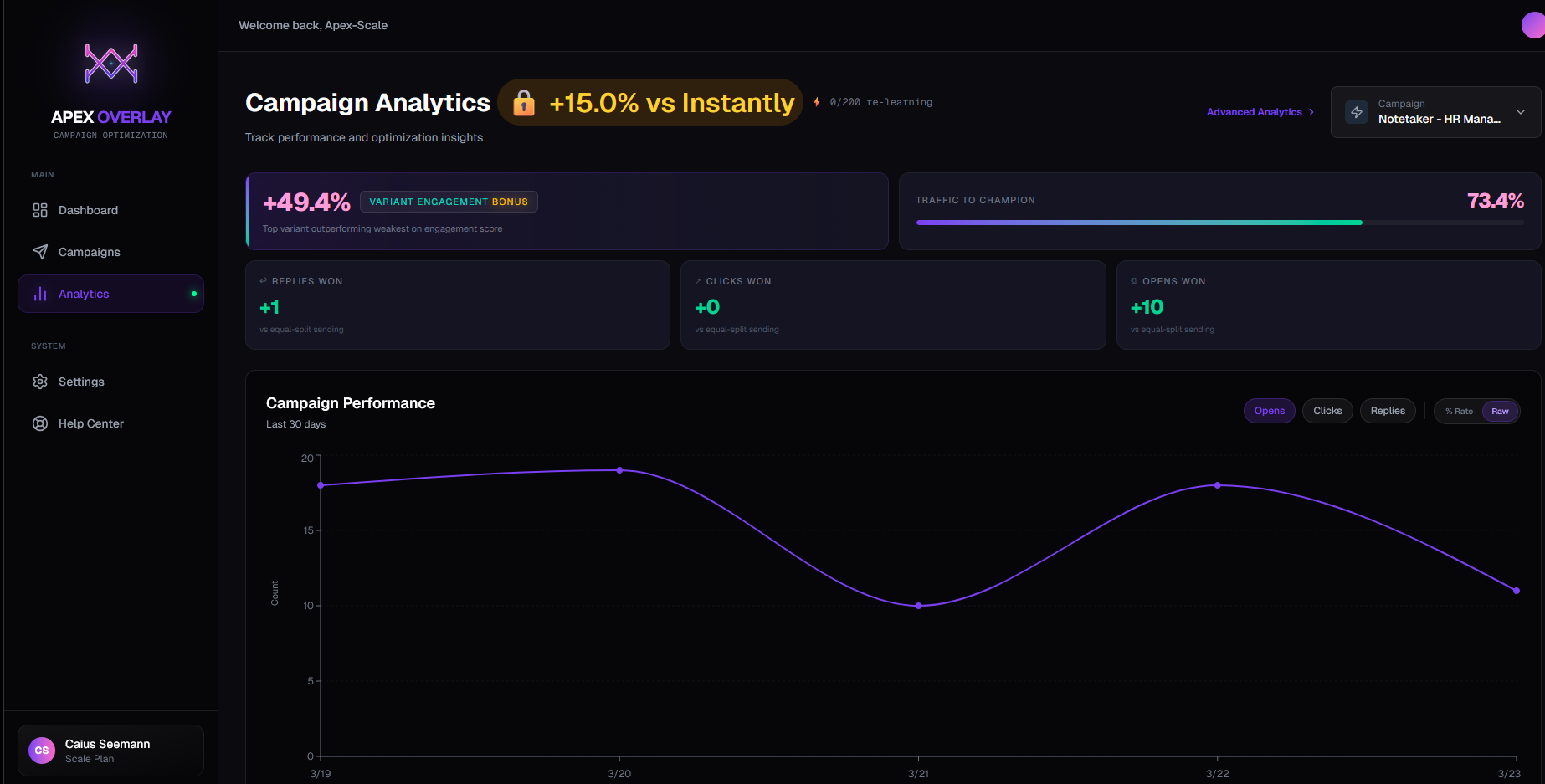
Results view · +15.0% vs Instantly · HR Managers campaign
Which email gets sent most, shifting in real time · HR Managers
"thought this might be useful"76.8%
"interesting regulation coming"15.2%
"one hr ops headache"8.0%
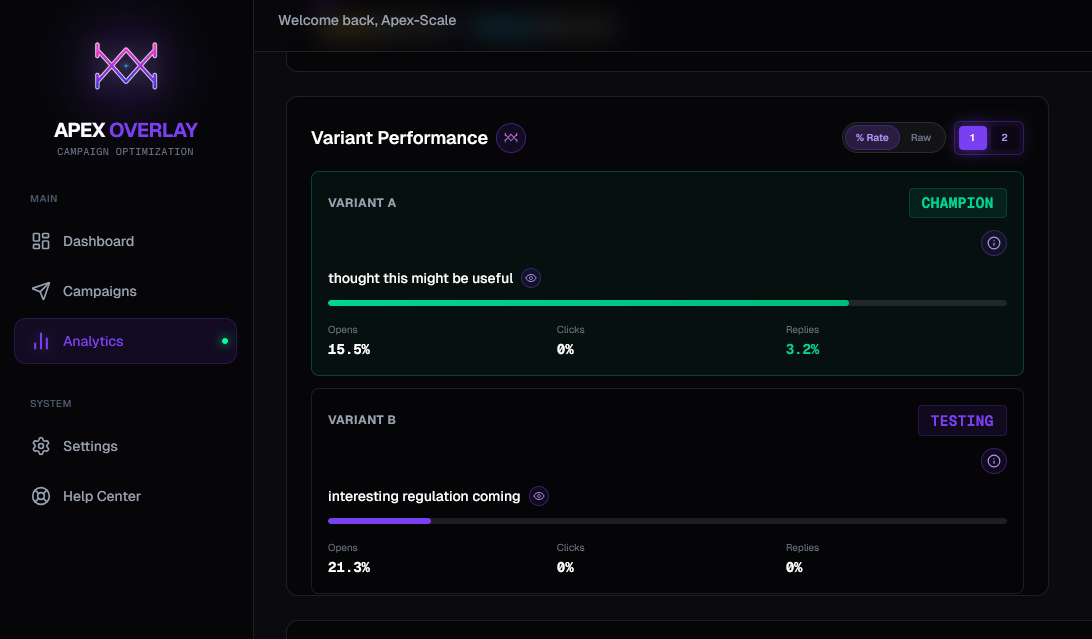
Email performance · 3.2% reply rate on winning email vs 0% on others
What subject line styles work best for HR cold email?
Low-pressure, curiosity-driven subject lines outperformed direct pitches in HR outreach. "Thought this might be useful" — a soft, deliberately non-salesy subject line — outperformed both a regulation-angle subject and a pain-point subject from the first sends. This is a pattern the StaffCircle data also surfaced: in HR outreach, low-pressure framing tends to outperform direct problem-statement framing.
The winning email is currently generating a 3.2% reply rate. The other two emails sit at 0%. Without optimization, 23% of sends would still be going to those underperforming emails daily — burning budget on copy that isn't working.
76.8%
Sends going to best email · HR Managers
from 33% equal-split on day 1
+14.2%
More engagement vs Instantly
HR Managers · day 3
3.2%
Reply rate · winning email
vs 0% on the other emails
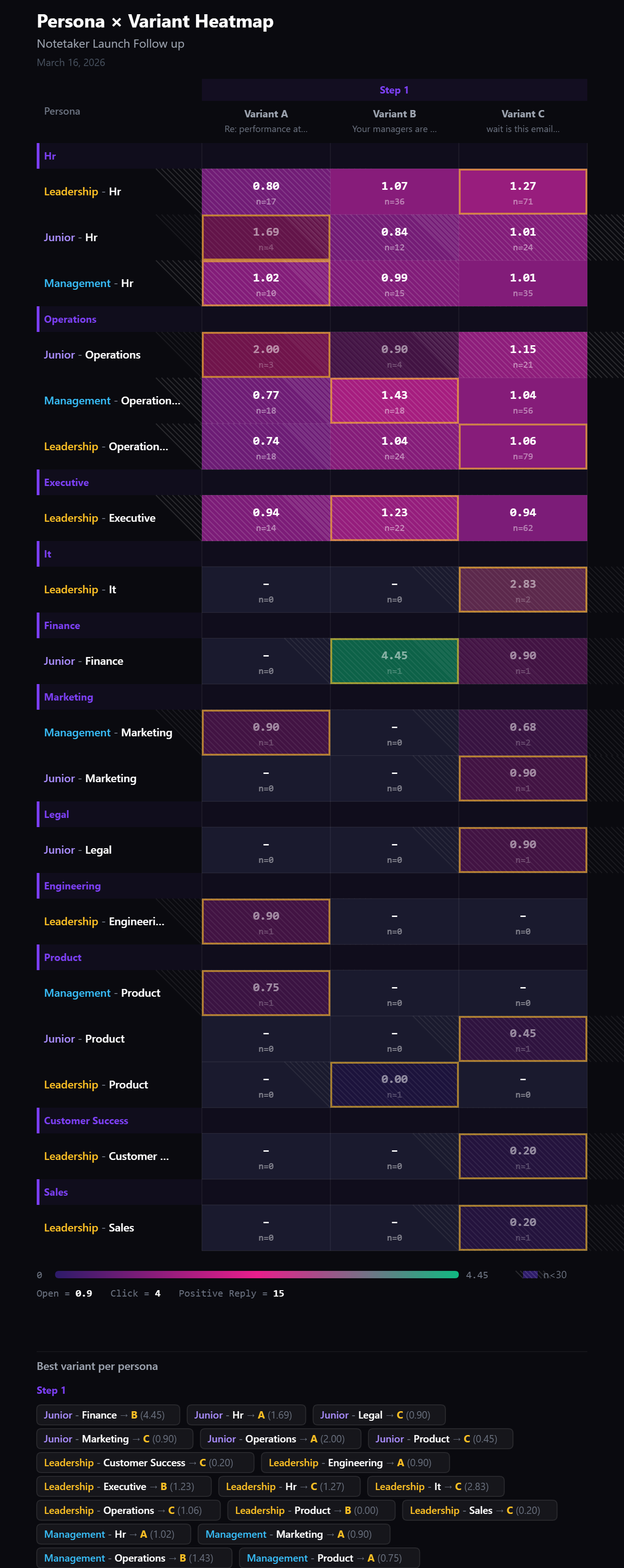
Persona heatmap · Performance score by segment + best email per audience · Notetaker campaign
Score = how we rank each email: Open = 0.9 points · Click = 4 points · Positive Reply = 15 points · Higher is better · Striped cells = not enough data yet (fewer than 30 sends)
What Apex Adds Beyond Native A/B Testing
Instantly’s auto-optimize waits, then guesses — using data that’s partly fake.
Instantly’s auto-optimize monitors your emails and when one pulls ahead, it kills the others — routing all sends to the winner. Sounds right. In practice there are three problems Apex Overlay is designed to fix.
THE KILL SWITCH PROBLEM
Instantly’s kill-switch hurts your deliverability
When auto-optimize fires, your sending domain goes from 3 different email patterns to 1 overnight. That sudden homogeneity is exactly what email security systems are trained to flag.
Spam filters look for unnatural uniformity — a domain that abruptly starts sending the same subject line and structure to hundreds of people is a behavioural signal of bulk automation. Your deliverability takes the hit.
- Natural human senders vary their language — they don't send identical emails
- Abrupt pattern shift is detectable at the infrastructure level
- Deliverability damage compounds over time and is slow to recover
THE DATA PROBLEM
It picks winners using fake data
Auto-optimize watches clicks and opens to decide which email wins. But a significant share of those clicks aren’t human — they’re email security systems automatically scanning links when emails arrive.
In the StaffCircle campaign, Instantly reported a 7.88% click rate. After filtering for click latency, the real human click rate was 5.41%. 26 of 83 clicks were bots. Auto-optimize doesn't know that. It's picking a winner based on data that's 31% noise.
- Security scanners fire click events indistinguishable from real clicks
- The email that attracts more bot scans looks like it’s winning — it isn't
- Apex Overlay filters out bot clicks before making any decisions
THE THRESHOLD PROBLEM
You waste sends while waiting for it to decide
Auto-optimize waits until one email crosses a send threshold before it does anything. Until that moment every email gets equal traffic — and you're burning sends on weaker copy the whole time.
Apex Overlay starts shifting sends from day one. Every reply, every real click, every genuine open shifts how sends are split — immediately. There’s no threshold to reach, no waiting period — the engine is always learning and always adjusting.
- Auto-optimize: equal split → hard switch at threshold → one email forever
- Apex Overlay: gradual shift from send 1, getting smarter with every reply and click
- The leads you send to while Instantly is still splitting evenly are gone — you can't recover them after the flip
Apex Overlay never kills an email entirely. Weaker emails keep a small share of sends so your sending pattern stays natural and deliverable. The best email earns the majority of sends — and that share updates continuously, not once.
Apex Overlay · How the optimization engine works
What happens when you connect a campaign.
No migration. No rebuild. Your existing Instantly sequences keep running — the engine adds a decision layer on top.
01 · CONNECT
Link your Instantly account
Add your API key in Settings. Apex Overlay syncs your campaigns immediately. Your sequences keep running exactly as they are.
2 minutes02 · ACTIVATE
Click Optimize on any campaign
One click activates the engine on any campaign with 2 or more email versions. It starts tracking results immediately — nothing changes in Instantly's UI.
One click03 · COMPOUND
Sends shift automatically
More sends go to your best-performing email from day 1. By day 10–14 you’re at 70–90% on your winner. The other emails keep a small share to maintain natural sending patterns.
No manual work
What this means for your campaigns.
Conservative estimate based on observed data. Some campaigns show significantly more.
Extra replies calculator
Based on live campaign data
Extra replies per month
vs equal-split A/B testing
Sends shifted to your best email
+2,400
per month vs equal-split
Days saved vs manual A/B
5.3
typical time to find a winner
Stop sending your best leads your worst email.
Connect your Instantly account, click Optimize on one campaign, and see sends start shifting to your best email within your first 50 sends. No migration. No rebuild. Use code FOUNDING for 3 months free.
Only 10 codes available · Connects to Instantly.ai in under 2 minutes